Dealer Portal Help / About SafedoorPM / Offline use and synchronization
Offline use and synchronization
SafedoorPM is a networked system of devices and users. For any given SafedoorPM account, there can be several mobile devices in use as well as different users working in the Dealer Portal and/or Customer Portals.
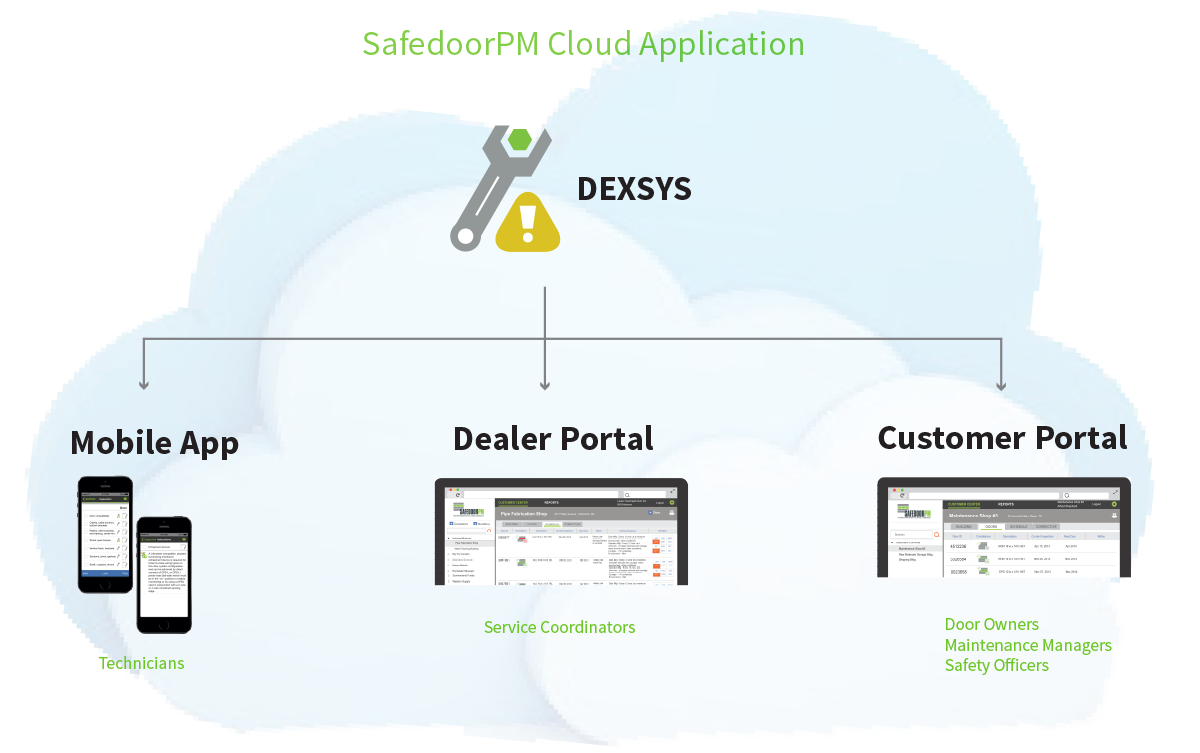
All information inputted to devices (eg. inspections, grades, photos, notes) is pushed to the main SafedoorPM database via cellular network or internet connection, and then out to other devices in the network. This process is called synchronization, and is what allows somebody on the Dealer Portal to see information that was inputted by a field technician on his iPhone.
Because of network availability, speed limitations, and queueing protocols, it can take time (several minutes to several hours) for information to spread to all devices in the network. It is not uncommon for information inputted by a technician in the field to not be immediately visible to a Dealer Portal user back in the dealer's office.
Offline use of the mobile app
SafedoorPM is designed so the mobile app can function without a network connection for extended periods of time. This gives technicians full functionality when they are on job sites with no cellular service or wifi connection, or if they temporarily lose connectivity.
However, it's important for devices used offline to regularly synchronize with the main database so that all users, including Dealer Portal and Customer Portal users, are seeing the same data, and to avoid data conflicts. Synchronization occurs automatically when a device is connected to a network.
A data conflict occurs when the same field of the same record (eg. a grade of an inspection element) is edited by two offline users so that the values are not the same, and, upon restored connectivity, the database is presented with the dilemma: Which input is the "correct" one? SafedoorPM's database system will detect such conflicts and automatically resolve them using the rule: The most recent entry, wins.
Tip [ Avoid editing documents (eg. inspection, note, configuration) simultaneously with another user. Network latency can cause data conflicts to occur. For example, do not edit an inspection on the Dealer Portal when you know the technician is still working on it out in the field on the mobile app. ]